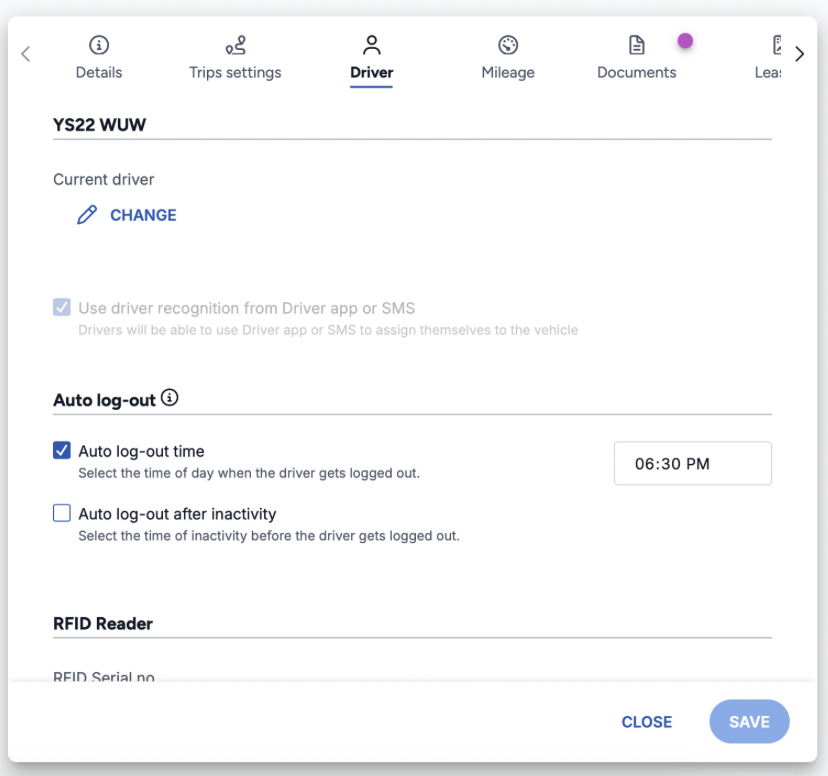
Automatically logs out drivers at specific times you choose, such as the end of a shift or at midnight.
Best for:
Companies with regular shift changes
Ensuring clean handovers between morning and afternoon shifts
Daily resets at midnight for next-day drivers
Log in to your ABAX account
Navigate to Admin > Vehicles
Select the vehicle you want to configure
Click the Driver tab
Under auto-logout settings, select Auto-logout at selected time
Enter the time when you want drivers to be logged out
Click Save
Example configuration:
12:00 PM (lunch shift change)
5:00 PM (end of day shift)
12:00 AM (midnight reset)
Currently, auto-logout settings are configured per vehicle. If you have a large fleet and need to apply the same settings to many vehicles, please contact ABAX support for assistance.
Future update: Organization and department-level configuration to make bulk setup easier.